

The DATEV integration of Tidely
Your open items from DATEV. Automatically synced in Tidely. Always up-to-date. The DATEV integration for self-bookkeepers and tax advisors keeps your liquidity planning current, entirely without manual exports.
The DATEV integration in detail
The DATEV integration automatically synchronizes your open items with Tidely, ensuring your liquidity planning is always current. This integration supports any workflow, whether you manage your books in DATEV directly or work with your tax advisor. You will need an active DATEV data set and a Tidely Professional, Business, or Enterprise package for this.

How it works
The DATEV integration automatically transfers your open items (OPOS) from DATEV to Tidely, optimizing your liquidity planning. The synchronization runs in the background, ensuring your receivables and payables are always up-to-date in Tidely. This gives you a constant overview of your incoming and outgoing payments, whether you handle your own bookkeeping or work with your tax advisor. Say goodbye to manual exports and outdated data.

Requirements
To utilize the integration between Tidely and DATEV, you need a Tidely account with the 'Professional' package or higher, as well as an active DATEV data set, either in your own instance (if you handle your own bookkeeping) or with your tax advisor. The DATEV integration is billed as an add-on; you can find the current prices on our pricing page.

Integration
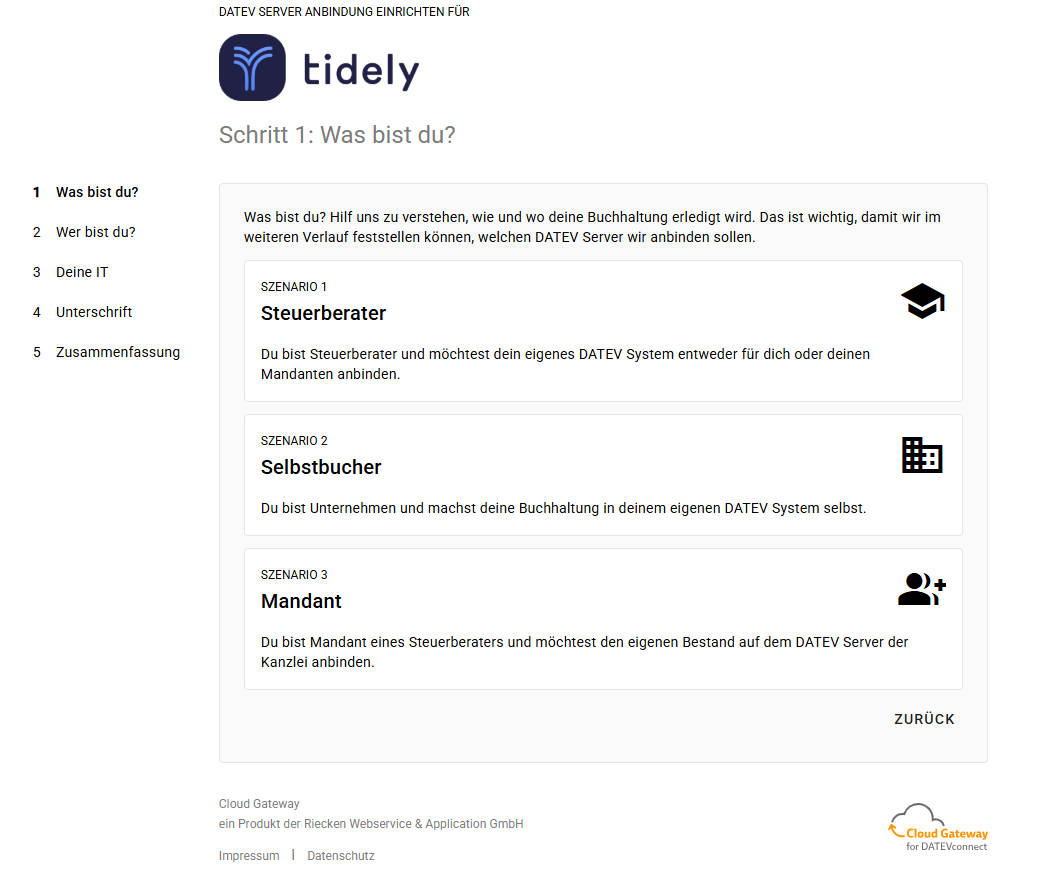
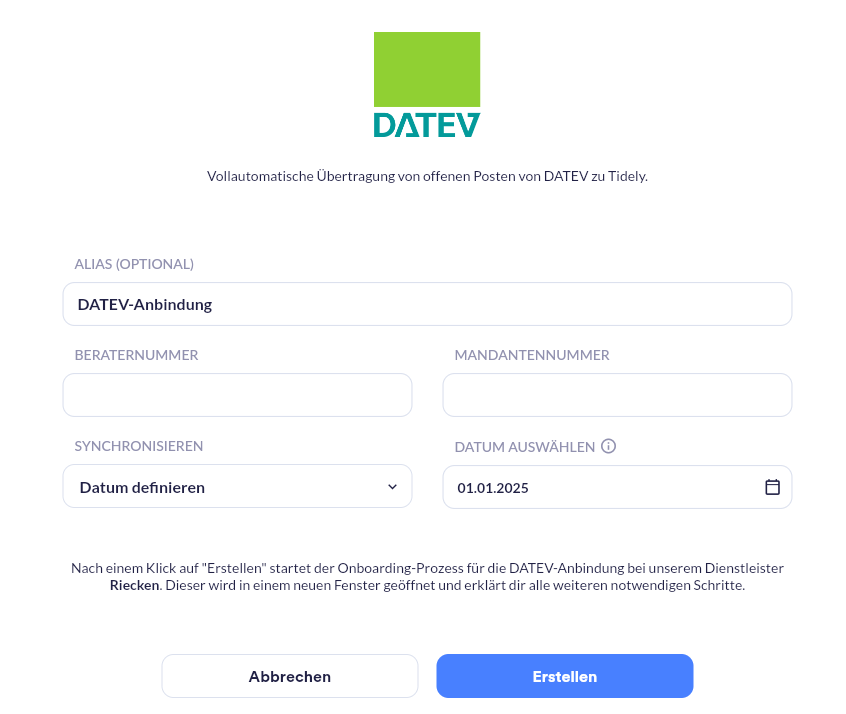
After registration, you will find the 'DATEV' entry in the sidebar menu under 'Settings', 'Data Sources', 'Accounting Software / ERP'. Select it, click 'Connect', and enter the connection name, consultant, client number, and period. The authorization is securely handled by our interface partner, after which your open items will be automatically transferred and synchronized.
DATEV: DATEV Integration for Cash Flow Planning with Tidely
Tidely's DATEV integration directly connects your DATEV data with your liquidity planning. Through the DATEV interface, your open items (OPOS) – meaning all debtors and creditors – are automatically synchronized with Tidely as soon as the transactions are posted. The connection works for every setup: for self-bookkeepers with their own DATEV instance, for companies working with a tax advisor, and for accounting firms with multiple clients. Data transfer is securely handled via a certified DATEV interface partner. This ensures your liquidity planning is always based on up-to-date figures, completely eliminating manual DATEV exports, error-prone Excel lists, or outdated data. The DATEV connection is available as an add-on; you can find current pricing on our pricing page.
The benefits of DATEV
- Automatic Open Items Synchronization: Your open items are transferred directly from DATEV to Tidely and continuously kept up-to-date, without any manual exports.
- Suitable for every workflow: Works for companies doing their own bookkeeping, for collaboration with tax advisors, and for firms managing multiple clients.
- More precise cash flow planning: With daily updated receivables and payables, your cash flow forecast is always based on reliable figures.
- Fewer errors, more time: The automatic transfer replaces error-prone Excel lists and saves valuable working time for the finance team.
- Secure and GDPR compliant: Encrypted transfer via a certified DATEV interface partner, with all data staying within the EU. Tidely is hosted in Germany.
- Flexible connectivity: Not ready for direct integration yet? You can also manually upload your DATEV open item lists as Excel files to Tidely at any time.
FAQs
How do I connect DATEV to Tidely?
In Tidely, go to the side menu under "Settings", "Data sources", "Accounting software / ERP" and select the "DATEV" entry. Choose it, click "Connect" and enter the connection name, consultant and client number, and the synchronization period. The authorization then runs securely via our certified DATEV interface partner.
Which data is transferred from DATEV to Tidely?
Your open items (OPOS) are transferred, meaning all outstanding receivables (debtors) and payables (creditors), as soon as the documents are posted in DATEV. They are automatically synchronized with your liquidity planning in Tidely.
Does the DATEV integration also work with my tax advisor?
Yes. The integration works for any setup: for self-bookkeepers with their own DATEV instance, for companies whose accounting is handled by a tax advisor, and for firms managing multiple clients. If your accounting is handled by your tax advisor, you simply forward them the onboarding link for authorization.
How much does Tidely's DATEV integration cost?
The DATEV integration is available as an add-on and is billed in addition to your Tidely plan. You can find the current prices on our pricing page.
What requirements do I need for the DATEV connection?
You need an active DATEV dataset and a Tidely "Professional" plan or higher. Tidely is cloud-based, so all you need is an internet-capable browser and an internet connection.
Is the DATEV synchronization secure and GDPR-compliant?
Yes. Data is transferred end-to-end encrypted via an official, certified DATEV interface partner. The interface is certified to ISO/IEC 27001:2022 and ISO/IEC 27017:2015, is DORA-compliant, and is used in cooperation with DATEVasp and DATEV Smart IT. All data stays within the EU. Tidely itself is developed and hosted in Germany and is GDPR-compliant.
What exactly can Tidely see or do in my DATEV system?
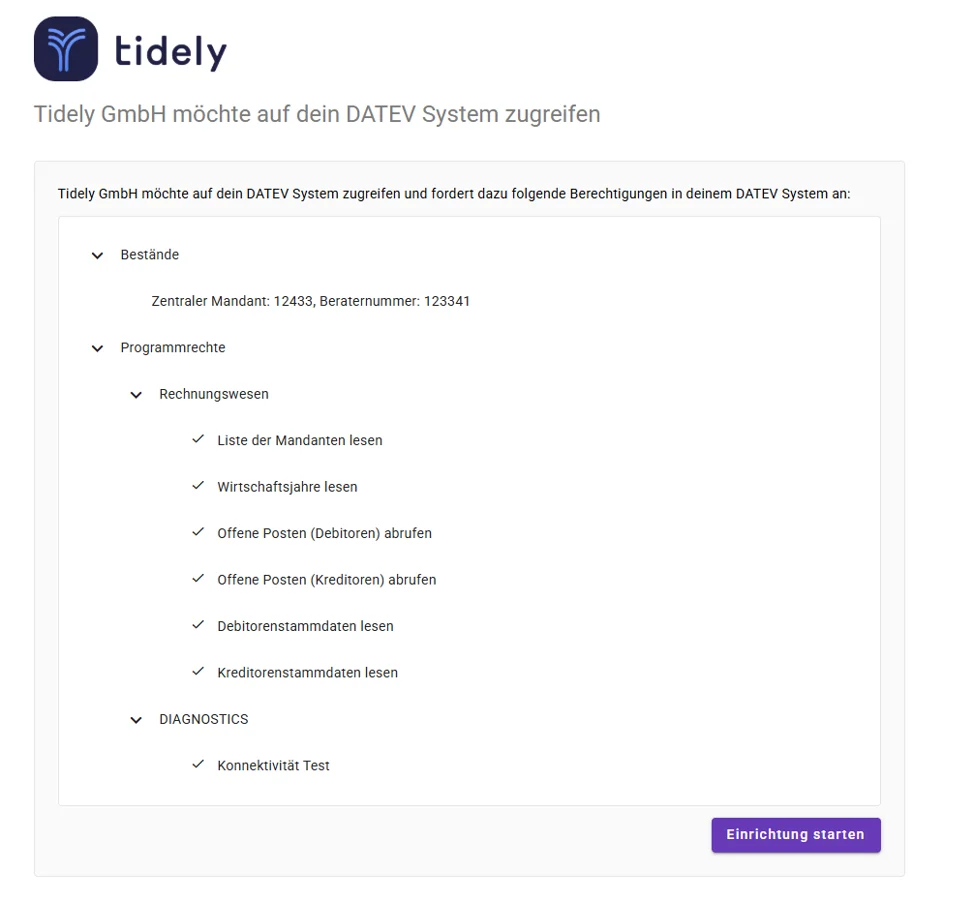
Tidely only receives access to the data you release, namely your open items (OPOS). There is no unrestricted access to your DATEV system. Only the functions required to synchronize your liquidity planning are released.
Can I disconnect the DATEV connection again at any time?
Yes. Authorization is granted solely by you and can be revoked at any time. No data is transferred without your explicit consent.
Is a permanent copy of my DATEV data stored?
No. Under normal operation, no permanent functional copy of your DATEV dataset is retained. Only operationally necessary technical data as well as authorization, logging, and support data are processed and stored.
Can I use DATEV data without the automatic interface?
Yes. You can export your DATEV OPOS lists manually as Excel files at any time and upload them to Tidely, separated into incoming and outgoing invoices.